Sign Up
While the user can access most features like the Bible, Commentaries, Sign Language Bible etc. without ‘Signing Up’, the user needs to Sign Up and create an account on VachanOnline to access the Bookmarks , Highlights and Notes features.
There are two ways to Sign Up on VachanOnline as described below.
Sign Up with Google
If you have an existing Google account which you want to use, no Sign Up is required. You can go directly to the the Sign In instructions page.
Sign Up with an Email
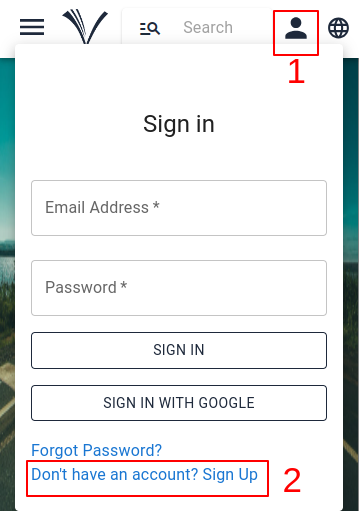
The user can click the SIGN IN (1) button which is on the top bar of any page to create an account.
Next, select the link ‘Don’t have an account? Sign Up’ (2).
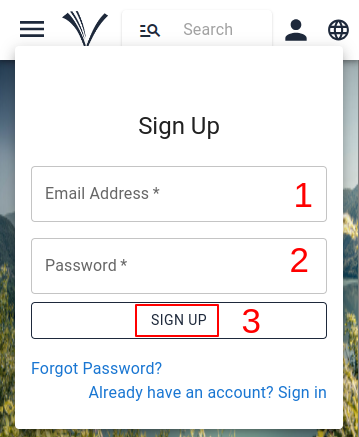
After entering Email address (1) and Password (2), the user must click ‘Sign up’ (3). ( See image below)
Note: Please make a note of your Email and Password to Sign In next time
The user’s account will be created, and a confirmation email will be sent to the email address provided by the user.