Search Bible
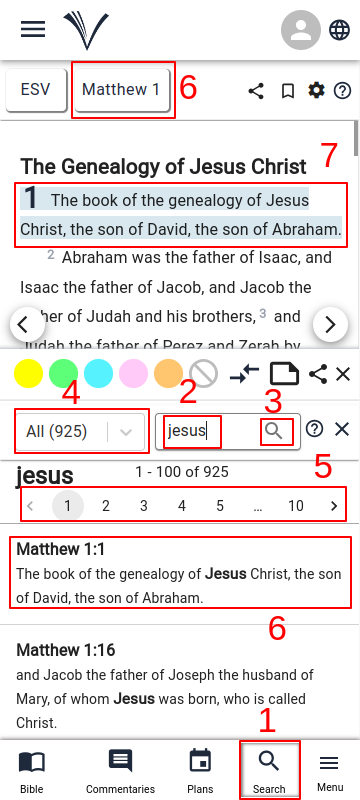
The Search Bible feature can be accessed by clicking on the Search Icon (1) in the bottom navigation bar on the Study Bible Page.
Search for phrase in bible opened on top
The user must enter a search phrase in the search box (2).
Click on the search button (3) attached to the search box.
Users can narrow down their search by choosing options at (4) like "All Books (ALL)," "Old Testament (OT)," "New Testament (NT)," or specific books within the Bible.
The total search result count and page controls are shown below the search box (5).
Click the page number or the left and right arrows to navigate between the pages.
The search results are shown page wise below the search box with the search term in bold.
To open the bible reference for a search result, click on any search result row (6).
The book drop-down changes as per the book and chapter of the search result (6) and verse is highlighted (7).