Sign In
The user can Sign In to VachanOnline in two ways as described below.
Sign In with Google
To Sign In with your existing Google account doesn’t require the user to fill in the sign-up form. You just need to be logged in to your Google account on the same browser.
The user can first click the 'Sign In' (1) button in the upper right corner ( See image below)
Then click the button 'Sign in with Google' (5) and select their Google account in the dialog that opens and login to the Google account if required.
Sign In with an Email
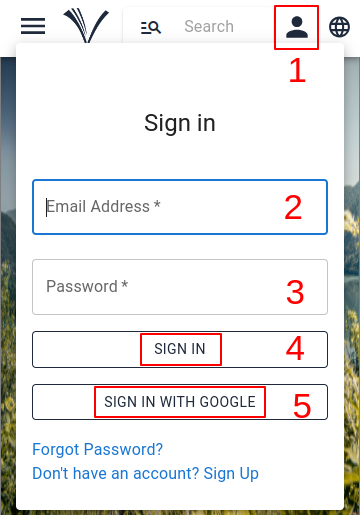
To Sign In to VachanOnline, the user must first click the 'Sign In' (1) button in the upper right corner.
Enter their email address (2) and Password (3) and then click the 'Sign In' (4) button.
Note:- Users must 'Sign Up' before they can 'Sign In' with Email to VachanOnline.com. ( See how to Sign Up )